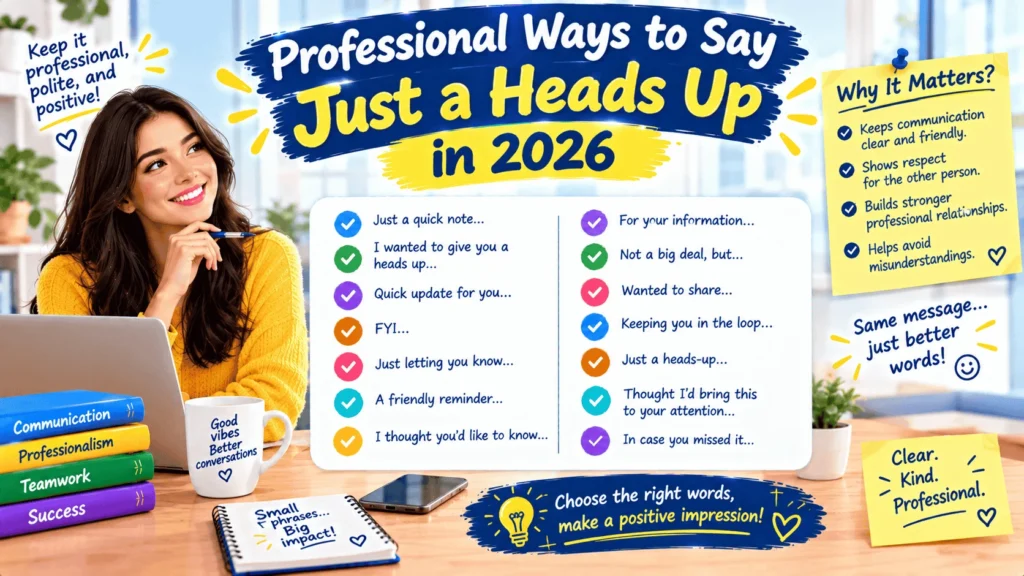
Looking for professional ways to say just a heads up? The phrase “just a heads up” is common in everyday conversation, but it can sound slightly casual in professional emails, client messages, workplace communication, and formal business writing. Fortunately, you can choose from many polite alternatives depending on your audience, purpose, and level of formality.
A professional alternative can make your message sound clearer without making it unnecessarily formal. For example, you might write “I wanted to let you know” to a client, “Please be aware that” in a formal notice, or “I wanted to give you a quick update” to a colleague.
The best choice depends on what you want to communicate. Some phrases simply provide information, while others alert someone to a change, deadline, issue, or upcoming event.
This guide explains the meaning of “just a heads up,” when to use it, and 27 professional, formal, friendly, and email-ready alternatives.
What Does “Just a Heads Up” Mean?
“Just a heads up” means giving someone advance information or a brief warning about something they should know.
It usually tells the reader:
- Something is changing.
- Something may affect them.
- An event is approaching.
- They need to prepare.
- You want them to know something before it happens.
Literal Meaning
The expression does not literally refer to someone’s head. It is an informal idiom meaning “I want to make you aware of something.”
For example:
Just a heads up, the office will close early on Friday.
A more professional version would be:
I wanted to let you know that the office will close early on Friday.
Tone
“Just a heads up” normally sounds:
- Casual
- Friendly
- Direct
- Informal
- Conversational
It works well among colleagues and people you know. However, a more polished phrase may suit formal emails, clients, senior managers, or official announcements.
Purpose
The purpose is usually to provide information before the person needs to act on it.
For example:
Just a heads up, our meeting has been moved to 3 p.m.
The message gives the recipient time to adjust their plans.
Emotional Context
The phrase can also soften information that might otherwise sound abrupt.
Compare:
The deadline has changed.
with:
Just a heads up, the deadline has changed.
The second sounds more conversational and less blunt.
27 Professional Ways to Say “Just a Heads Up”
1. I Wanted to Let You Know
Tone: Professional, polite, neutral
Best use: Emails, clients, managers, colleagues
This is one of the most versatile alternatives and works in almost any professional setting.
Example:
I wanted to let you know that the delivery date has changed to Thursday.
2. I Wanted to Inform You
Tone: Formal, professional
Best use: Formal emails, official communication
Use this when you want a more formal alternative to “just a heads up.”
Example:
I wanted to inform you that the office will be closed on Monday.
3. Please Be Aware That
Tone: Formal, direct
Best use: Policies, notices, client communication
This phrase clearly signals that the reader should pay attention to the information.
Example:
Please be aware that our support hours will change next month.
4. Please Note That
Tone: Professional, formal
Best use: Business emails, instructions, announcements
“Please note that” is concise and useful when the information is important.
Example:
Please note that all invoices must be submitted by Friday.
5. I’d Like to Let You Know
Tone: Polite, professional
Best use: Client emails, customer service, workplace communication
This sounds slightly warmer than “I wanted to inform you.”
Example:
I’d like to let you know that your request has been approved.
6. I Wanted to Give You a Quick Update
Tone: Friendly, professional
Best use: Colleagues, managers, project communication
Use this when the information relates to an ongoing task or project.
Example:
I wanted to give you a quick update on the project timeline.
7. I Wanted to Bring This to Your Attention
Tone: Professional, formal
Best use: Important issues, errors, deadlines, client communication
This phrase works particularly well when the recipient needs to notice something.
Example:
I wanted to bring this to your attention before we finalize the report.
8. I’d Like to Bring to Your Attention
Tone: Formal
Best use: Business letters, official emails
This is a polished option for more formal communication.
Example:
I’d like to bring to your attention a change to our payment terms.
9. Please Keep in Mind That
Tone: Polite, conversational
Best use: Advice, reminders, workplace communication
This works when you want someone to consider information while making a decision.
Example:
Please keep in mind that processing may take up to three business days.
10. For Your Awareness
Tone: Professional, concise
Best use: Internal emails and business updates
This phrase directly communicates that the information is being shared for awareness.
Example:
For your awareness, the client has requested an earlier delivery date.
11. For Your Information
Tone: Professional, neutral
Best use: Internal communication, reports, updates
“For your information” is useful when the recipient does not necessarily need to take action.
Example:
For your information, the revised schedule is attached.
12. I’m Writing to Let You Know
Tone: Formal, professional
Best use: Formal emails and notices
This phrase works especially well at the beginning of a formal message.
Example:
I’m writing to let you know that your appointment has been rescheduled.
13. I Thought You Should Know
Tone: Friendly, personal
Best use: Colleagues, trusted business contacts
This is warmer and less formal than “please be aware.”
Example:
I thought you should know that the client has approved the proposal.
14. I Wanted to Make You Aware
Tone: Professional, polite
Best use: Clients, managers, workplace communication
This is a direct synonym for “just a heads up” when you want a polished tone.
Example:
I wanted to make you aware of a minor change to the schedule.
15. I’d Like to Make You Aware
Tone: Formal, professional
Best use: Formal business communication
This option sounds polished without becoming overly complicated.
Example:
I’d like to make you aware that the submission deadline has been extended.
16. I Wanted to Give You Advance Notice
Tone: Professional, clear
Best use: Changes, deadlines, closures, scheduling
Use this when the main purpose is to give someone time to prepare.
Example:
I wanted to give you advance notice that the system will be unavailable tomorrow.
17. I’m Reaching Out to Let You Know
Tone: Friendly, professional
Best use: Client emails, networking, customer communication
This has a natural email-friendly tone.
Example:
I’m reaching out to let you know about a change to your appointment.
18. I Wanted to Share an Update
Tone: Friendly, professional
Best use: Projects, teams, clients
This is especially useful when the message contains new information.
Example:
I wanted to share an update regarding your application.
19. Here’s a Quick Update
Tone: Friendly, concise
Best use: Colleagues, internal emails, project chats
This is a natural choice for less formal workplace communication.
Example:
Here’s a quick update: the presentation has been moved to Wednesday.
20. I’d Like to Keep You Informed
Tone: Professional, considerate
Best use: Clients, managers, long-term projects
This emphasizes ongoing communication.
Example:
I’d like to keep you informed about the progress of the project.
21. I’d Like to Keep You Updated
Tone: Friendly, professional
Best use: Projects and client communication
Use this when you expect additional updates later.
Example:
I’d like to keep you updated as we move through the next stage.
22. Please Take Note That
Tone: Formal, direct
Best use: Notices and important instructions
This signals that the information deserves attention.
Example:
Please take note that the registration deadline is Friday.
23. Kindly Note That
Tone: Polite, formal
Best use: Formal business correspondence
This is particularly common in formal workplace communication.
Example:
Kindly note that the revised document is now available.
24. I’d Like to Flag
Tone: Professional, direct
Best use: Workplace discussions, project management, business emails
“Flag” is common in modern corporate communication.
Example:
I’d like to flag a potential issue with the current timeline.
25. I Wanted to Flag
Tone: Professional, conversational
Best use: Colleagues, managers, project teams
This sounds less formal than “I’d like to bring to your attention.”
Example:
I wanted to flag that we may need additional time to complete the review.
26. A Quick Note to Let You Know
Tone: Friendly, professional
Best use: Emails, internal updates
This is a useful middle ground between casual and formal.
Example:
A quick note to let you know that the meeting room has changed.
27. I’m Reaching Out to Inform You
Tone: Formal, professional
Best use: Client communication and formal emails
This works when you need a polished opening for an important update.
Example:
I’m reaching out to inform you that your order has been dispatched.
Quick Comparison Table
| Alternative | Tone | Best Use |
|---|---|---|
| I wanted to let you know | Professional | General emails |
| I wanted to inform you | Formal | Official communication |
| Please be aware that | Formal | Important notices |
| Please note that | Professional | Business emails |
| I’d like to let you know | Polite | Clients |
| I wanted to give you a quick update | Friendly | Workplace |
| Bring this to your attention | Formal | Important issues |
| Please keep in mind that | Friendly | Advice |
| For your information | Neutral | Internal updates |
| I wanted to make you aware | Professional | Business communication |
| Give you advance notice | Professional | Scheduling |
| I wanted to share an update | Friendly | Projects |
| I’d like to keep you informed | Professional | Clients |
| I’d like to flag | Professional | Workplace issues |
| A quick note to let you know | Friendly |
How to Use These Alternatives in Emails
Choosing the right business email phrases depends on your relationship with the recipient.
Client Email
I wanted to let you know that your order is expected to arrive on Thursday.
This sounds professional without being stiff.
Email to a Manager
I wanted to bring this to your attention before we proceed with the next stage.
This works when the manager needs to know about an issue or decision.
Email to a Colleague
Just a quick update: the meeting has been moved to 2 p.m.
A friendly professional tone works well between colleagues.
Customer Email
Please be aware that our support team will have limited availability this weekend.
The phrase clearly communicates information without sounding casual.
Networking Email
I wanted to let you know that I’ll be attending the conference next month.
This sounds natural and professional.
Meeting Follow-Up
I wanted to give you a quick update following our meeting. We have agreed to move forward with the revised timeline.
This makes the purpose of the email immediately clear.
When Should You Use “Just a Heads Up”?
“Just a heads up” is not incorrect. It is simply more casual than many professional alternatives.
It can work well when:
- You communicate regularly with the person.
- The workplace has a relaxed culture.
- You are messaging a colleague.
- The information is minor.
- You are writing an informal internal message.
For example:
Just a heads up, the conference room is unavailable tomorrow.
This sounds perfectly natural in a team chat.
However, consider a more polished alternative when writing to:
- New clients
- Senior executives
- Customers
- External partners
- Formal business contacts
- People you have never contacted before
Common Mistakes to Avoid
1. Using “Just a Heads Up” Too Often
Repeatedly using the phrase can make your emails sound repetitive.
Instead of:
Just a heads up…
in every message, rotate phrases such as:
I wanted to let you know…
Please note that…
I wanted to share an update…
I wanted to bring this to your attention…
2. Choosing a Formal Phrase for a Casual Situation
Not every workplace message needs formal language.
For example, this may sound unnecessarily stiff:
I would like to formally inform you that the meeting room has changed.
A colleague might prefer:
Just a quick update: the meeting room has changed.
Good workplace communication matches the tone to the situation.
3. Making the Message Too Vague
“Just a heads up” should introduce useful information.
Weak:
Just a heads up about tomorrow.
Better:
Just a heads up that tomorrow’s meeting will start at 10 a.m. instead of 9 a.m.
Be specific about what the reader needs to know.
4. Using “Kindly” in Every Message
“Kindly note” can be appropriate, but repeated use may sound overly formal or impersonal.
Choose the phrase based on your audience rather than using formal wording automatically.
5. Failing to Explain What Happens Next
If the recipient needs to act, tell them.
Instead of:
Please be aware that the deadline has changed.
Consider:
Please be aware that the deadline has changed to Friday. Please submit your documents by 5 p.m.
This improves clarity and follows good email etiquette.
Related Phrases and Expressions
Here are related business expressions that can replace or complement “just a heads up.”
- Please note — Draws attention to important information.
Please note that the deadline has changed. - Please be aware — Signals information the reader should know.
Please be aware of the updated requirements. - For your information — Shares information without necessarily requesting action.
For your information, the report is now available. - For your awareness — Provides information for the recipient’s knowledge.
For your awareness, the client has approved the proposal. - I wanted to let you know — Gives information politely.
I wanted to let you know that the schedule has changed. - I wanted to inform you — Formal notification.
I wanted to inform you of the policy update. - I wanted to flag — Highlights an issue or concern.
I wanted to flag a potential delay. - I wanted to highlight — Draws attention to something important.
I wanted to highlight one important detail. - I wanted to mention — Introduces additional information.
I wanted to mention that the client has responded. - A quick update — Introduces recent information.
A quick update: the project is back on schedule. - A quick note — Introduces a brief message.
A quick note to confirm tomorrow’s meeting. - Keep in mind — Encourages consideration.
Please keep in mind that processing takes several days. - Advance notice — Gives information before an event.
We are providing advance notice of the scheduled maintenance. - Bring to your attention — Highlights something important.
I wanted to bring this to your attention. - Keep you informed — Emphasizes ongoing communication.
We will keep you informed of any further changes. - Keep you updated — Promises future updates.
We’ll keep you updated as the project progresses. - I’d like to highlight — Formal emphasis.
I’d like to highlight the revised deadline. - I’m writing to let you know — Formal email introduction.
I’m writing to let you know about a change to your appointment.
“Just a Heads Up” vs. Professional Alternatives
The primary difference between “just a heads up” and its alternatives is usually tone and formality, not meaning.
| Phrase | Formality | Tone | Best Use |
|---|---|---|---|
| Just a heads up | Casual | Friendly | Colleagues |
| I wanted to let you know | Medium | Polite | General business |
| I wanted to inform you | High | Formal | Official messages |
| Please note that | Medium-high | Direct | Business emails |
| Please be aware that | High | Formal | Notices |
| I wanted to share an update | Medium | Friendly | Projects |
| I wanted to flag | Medium | Direct | Workplace issues |
| I wanted to bring this to your attention | High | Formal | Important matters |
| For your information | Medium | Neutral | Internal communication |
| I wanted to give you advance notice | Medium-high | Professional | Scheduling |
The most versatile formal alternative to “just a heads up” is often “I wanted to let you know.” It is professional, natural, and easy to adapt.
Cultural and Professional Usage
US English
“Just a heads up” is very common in American English, especially in informal workplace conversations, emails, instant messages, and team communication.
For example:
Just a heads up, the meeting starts at 10.
In more formal American business writing, alternatives such as “I wanted to let you know” or “Please note that” may sound more appropriate.
UK English
The phrase is also understood and used in British English. However, professional writers may choose phrases such as:
Just to let you know…
or:
Please note that…
depending on the context.
Corporate Communication
Modern corporate communication often favors concise phrases.
For example:
I wanted to flag a potential issue with the timeline.
This is direct without being unnecessarily formal.
Customer Service
Customer-facing messages should usually prioritize clarity and courtesy.
Instead of:
Just a heads up, your order may be late.
Try:
I wanted to let you know that your order may arrive later than expected.
This sounds more considerate and professional.
Networking
Networking messages benefit from a warm but polished tone.
For example:
I wanted to let you know that I’ll be attending the conference next week.
This feels more natural than an overly formal announcement.
FAQs
1. What is a professional way to say “just a heads up”?
A highly versatile option is “I wanted to let you know.” Other choices include “Please note that,” “I wanted to inform you,” and “I wanted to make you aware.”
2. Is “just a heads up” professional?
Yes, but it is generally considered casual or conversational rather than highly formal. It can work well with colleagues and in relaxed workplace communication.
3. What is a formal alternative to “just a heads up”?
Use “I wanted to inform you,” “Please be aware that,” “Please note that,” or “I wanted to bring this to your attention.”
4. Can I use “just a heads up” in an email?
Yes. It is acceptable in informal workplace emails, especially when communicating with colleagues you know well. For clients or formal correspondence, a more polished alternative may be better.
5. What is a polite way to give someone a heads up?
Try:
I wanted to let you know that…
or:
I wanted to give you advance notice that…
Both phrases provide information politely.
6. What is a professional synonym for “heads up”?
Depending on the context, useful alternatives include notice, update, information, alert, notification, reminder, warning, and advance notice.
7. Is “please note” better than “just a heads up”?
They serve similar purposes but have different tones. “Just a heads up” sounds casual and friendly, while “please note” sounds more professional and direct.
8. How do I say “heads up” to a client?
Use a customer-friendly phrase such as:
I wanted to let you know that…
For a more formal message:
Please be aware that…
9. What can I say instead of “just a heads up” to my boss?
You can write:
I wanted to bring this to your attention.
or:
I wanted to give you a quick update.
The best choice depends on whether you are sharing general information or highlighting an issue.
10. What is the best email phrase instead of “just a heads up”?
“I wanted to let you know” is one of the most flexible choices because it works with clients, managers, colleagues, customers, and professional contacts.
Final Summary
The best professional ways to say “just a heads up” depend on your audience and purpose. For everyday business emails, “I wanted to let you know” is natural and versatile. For formal communication, choose “I wanted to inform you” or “Please be aware that.” For workplace messages, “I wanted to give you a quick update” and “I wanted to flag” sound professional without feeling stiff. For clients and customers, prioritize clarity and courtesy. For casual colleagues, “just a heads up” is still perfectly acceptable. Good professional communication is not about using the most formal phrase; it is about choosing wording that fits the situation, relationship, and message.